If your API key isn’t working and you’re seeing 401 Unauthorized or 403 Forbidden errors, you’re dealing with an authentication or authorization failure. These two HTTP status codes look similar but mean very different things. Understanding the difference between 401 vs 403 APIs errors can save hours of debugging and help you fix the issue fast.
401 Unauthorized and 403 Forbidden are the most common HTTP errors when an API key fails, pointing to authentication or authorization issues. Understanding their differences helps you fix the problem quickly. Here’s a breakdown with troubleshooting steps.
This guide explains what each error means, why it happens, and exact troubleshooting steps developers can use immediately. You should need to now, API Key Rotation Zero-Downtime – How to Rotate and Revoke API Keys Safely
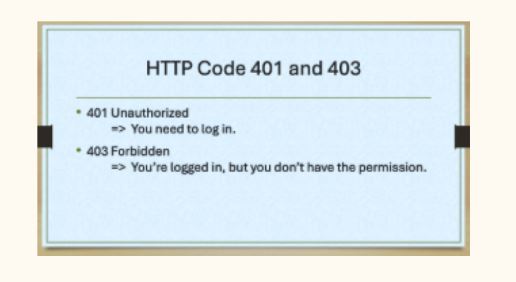
What Does a 401 Unauthorized Error Mean in APIs?
A 401 Unauthorized error means the API server cannot authenticate your request. In simple terms, the server doesn’t recognize who you are.
Common Causes of 401 Unauthorized API Errors
- Missing API key in the request
- Invalid or malformed API key
- Expired or revoked API key
- Incorrect authorization header format
- Environment variables not loading (very common in production)
- Using the wrong authentication method (API key vs OAuth token)
Example of a Correct Authorization Header
Authorization: Bearer YOUR_API_KEY
Content-Type: application/json
⚠️ Even an extra space before or after the key can trigger a 401 error.
What Does a 403 Forbidden Error Mean in APIs?
A 403 Forbidden error means the API successfully authenticated you, but you are not allowed to access the requested resource.
In other words:
- Your API key is valid
- Your identity is known
- But your permissions are insufficient
Common Causes of 403 Forbidden API Errors
- Missing required scopes or permissions
- API endpoint not enabled for your key
- IP address restrictions
- Domain or referrer restrictions
- Using a free plan for a paid-only endpoint
- Organization or account-level access limits
401 vs 403: Key Differences Explained
| Error Code | What It Means | Root Problem | Fix Priority |
|---|---|---|---|
| 401 Unauthorized | Authentication failed | API key invalid or missing | Validate or regenerate key |
| 403 Forbidden | Authentication succeeded | Permission or access denied | Check scopes & restrictions |
Rule of thumb
- 401 = “Who are you?”
- 403 = “I know you, but you can’t do that.”
Other Reasons Your API Key Might Fail (Often Overlooked)
Even if your key is correct, you may still face errors due to:
- 🚫 Rate limit exceeded (often returns 429, sometimes 403)
- 💤 Inactive or suspended account
- ♻️ Cached old API keys in deployed apps
- 🔄 Not restarting services after updating environment variables
- 🌍 Wrong environment (using test key in production or vice versa)
Step-by-Step Troubleshooting Checklist (Developer-Approved)
Verify the API Key
- Copy-paste directly from the provider dashboard
- Remove hidden spaces or line breaks
- Test the key using:
- API dashboard test console
- Validation endpoint (if available)
- Postman or cURL
Regenerate the Key (If Needed)
- Create a new API key
- Replace it everywhere (backend, frontend, CI/CD, cron jobs)
- Restart your server to clear cached values
Check Authorization Headers & Format
Make sure:
- Header name is correct (
Authorization) - Prefix is correct (
Bearer,Token, or provider-specific) Content-Typematches API requirements
Review API Key Restrictions
Check if your API key is restricted by:
- IP address
- Domain or referrer
- Specific API endpoints
- Scopes or roles
Update restrictions or align your request source accordingly.
Test Incrementally
- Test a simple endpoint first
- Compare working vs failing requests
- Check:
- API logs
- Error messages
- Provider status page
Quick Fix Reference Table
| Error | What to Check First |
|---|---|
| 401 | API key validity & header format |
| 403 | Permissions, scopes, IP/domain rules |
Final Debugging Advice for Developers
If your API key still isn’t working:
- Read the official API docs carefully (especially auth section)
- Check recent key rotations
- Confirm billing or plan limits
- Avoid hard-coding keys during testing
- Log request headers (without exposing secrets)
Flowchart (401 vs 403 decision tree)
API Request Fails
        |
        v
 Is there an API error?
        |
        v
   HTTP Status Code?
        |
   ┌────┴─────┐
   |          |
 401        403
   |          |
   v          v
Auth failed  Auth OK, access denied
   |          |
Check API     Check permissions,
key validity  scopes, IP/domain
   |          |
Regenerate    Update restrictions
or fix header or upgrade plan